Your music, and everything that goes with it.
Recordings, stems, lyrics and scores, kept as files in your own folders and in agreement with their tags. Every change is a plan you read before it’s made, and Undo takes it back, even after a crash.
Stems, MIDI and lyrics on the Mac. Tags, names, folders and scores on Mac, iPad and iPhone.
- Native on Mac, iPad & iPhone
- On-device, one purchase
- Undo survives a crash
- MP3 · ID3v2.3 / v2.4
- AAC · M4A · M4B · ALAC
- OGG · VORBIS / OPUS
- FLAC · AIFF · WAV
- ICLOUD DRIVE AWARE
Your folder, as it is on disk.
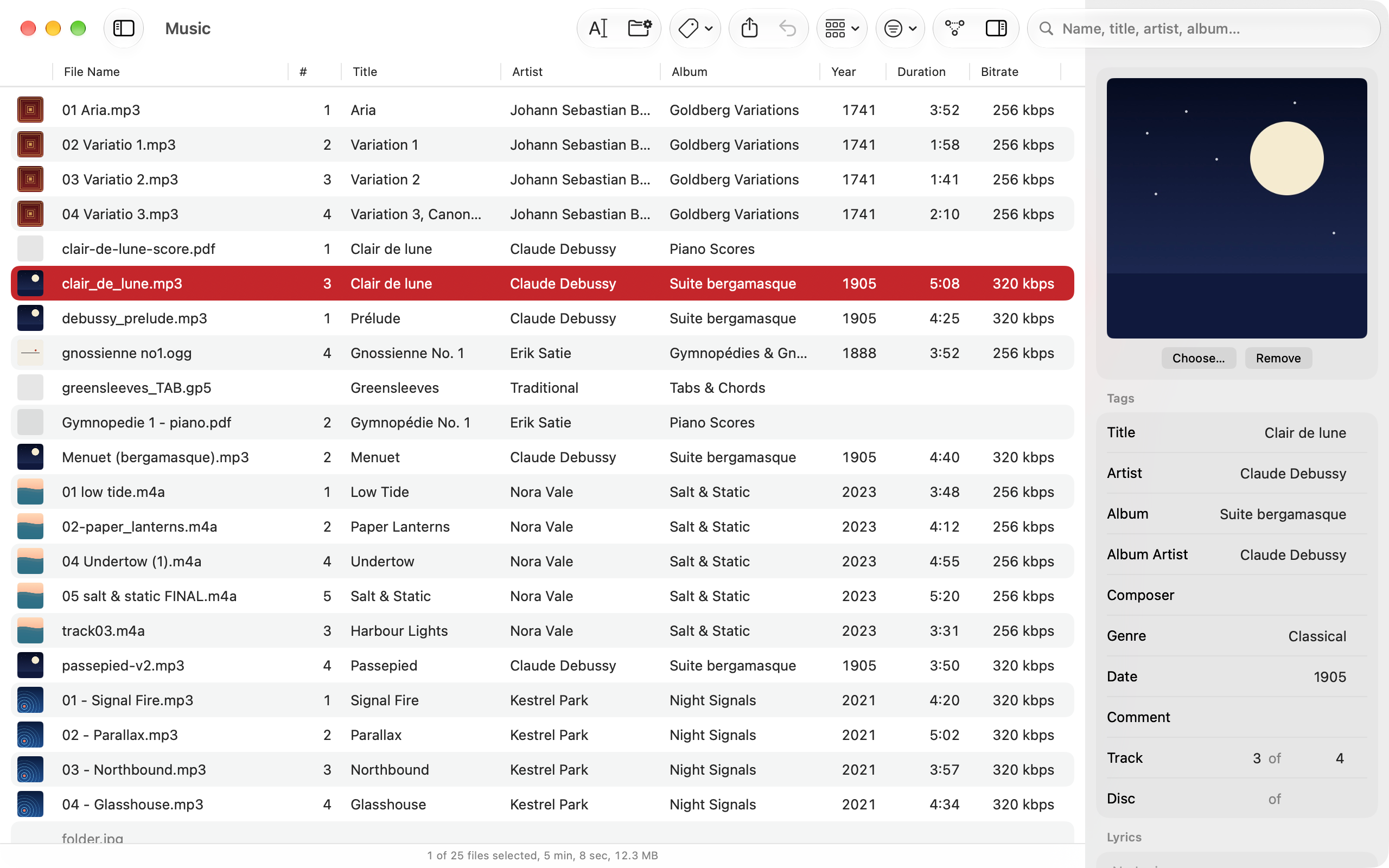
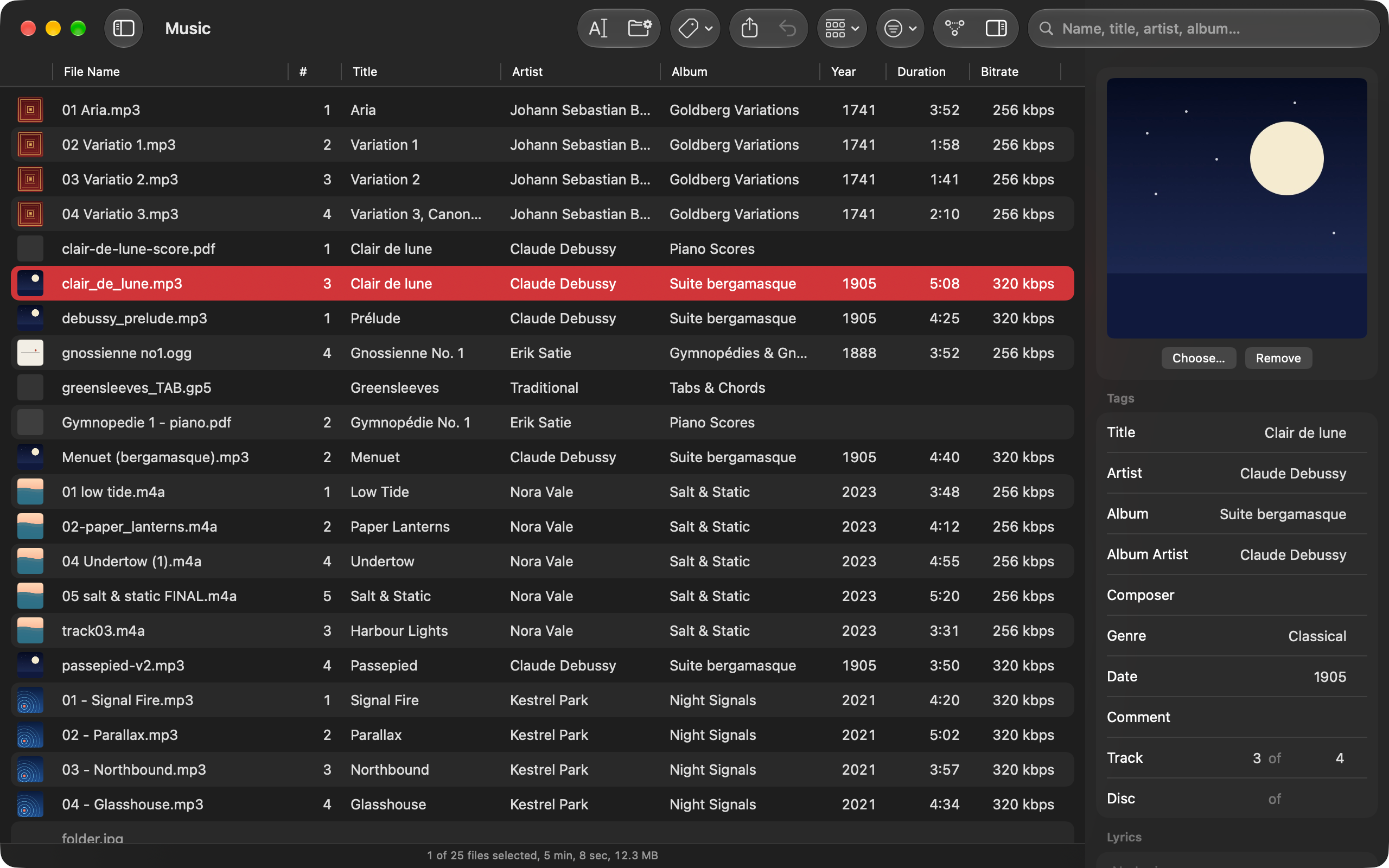
No import and no database. Pochette lists the files in the folder you open, with the tags, covers and lengths read straight from each one.
Everything a song comes with, kept beside it.
On the Mac, Pochette splits a track into stems, turns it into MIDI and drafts its lyrics, on the device. Each result is an ordinary file beside the track, made in one change that Undo takes back.
- Mac
Stems
Vocals, drums, bass, guitar, piano and the rest, as six files in a folder beside the track. The model downloads once, when you first ask for it.
03 - Phare (Stems)/
↳ six .flac stems - Mac
MIDI
The notes of the piano, bass, guitar and strings, as one MIDI file in the same folder: a sketch to read from or play along with.
03 - Phare (Stems)/
↳ Phare.rmi - Mac
Lyrics
A draft for each track, heard on its voice alone if you like. You edit the drafts and tick the ones to keep; nothing is written before you do.
LYRICS
↳ a draft to review - Mac · iPad · iPhone
Scores and tabs
PDF scores, Guitar Pro tabs and MIDI files take tags, and are renamed and organized by them like a track. Tabs and MIDI files play, every part on its own instrument.
Basse Saison/
↳ Phare.pdf, Phare.gp5
One set of facts. Three places it drifts.
A tag gets fixed and the file keeps its old name. An album moves and its folder no longer says who made it. Pochette treats the tags as the source of truth, and derives names and folders from them with a pattern.
The source of truth
Title, artist, album, album artist, track and disc, year, genre, composer, comment, cover art. The same fields across every audio format.
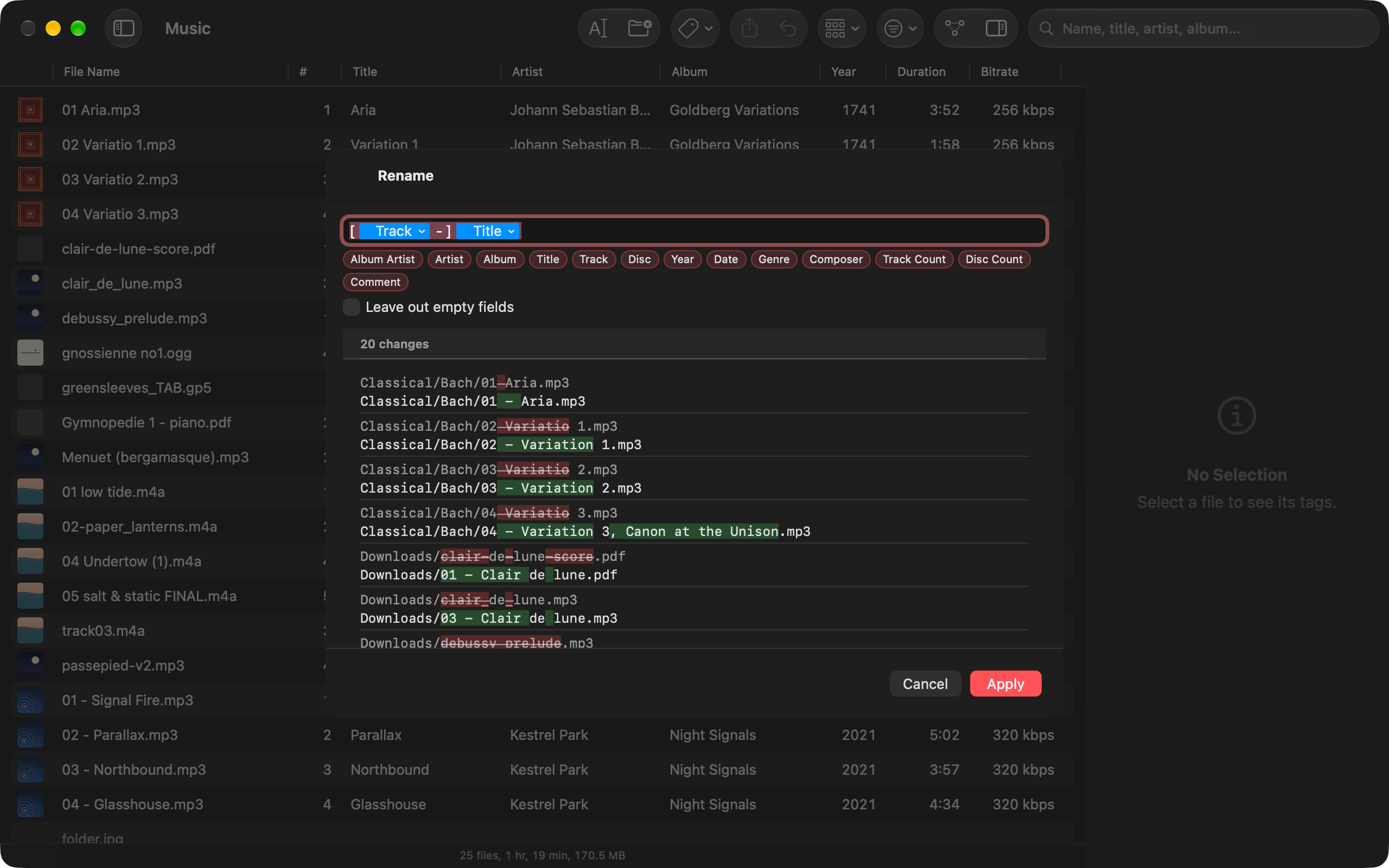
Rename by pattern
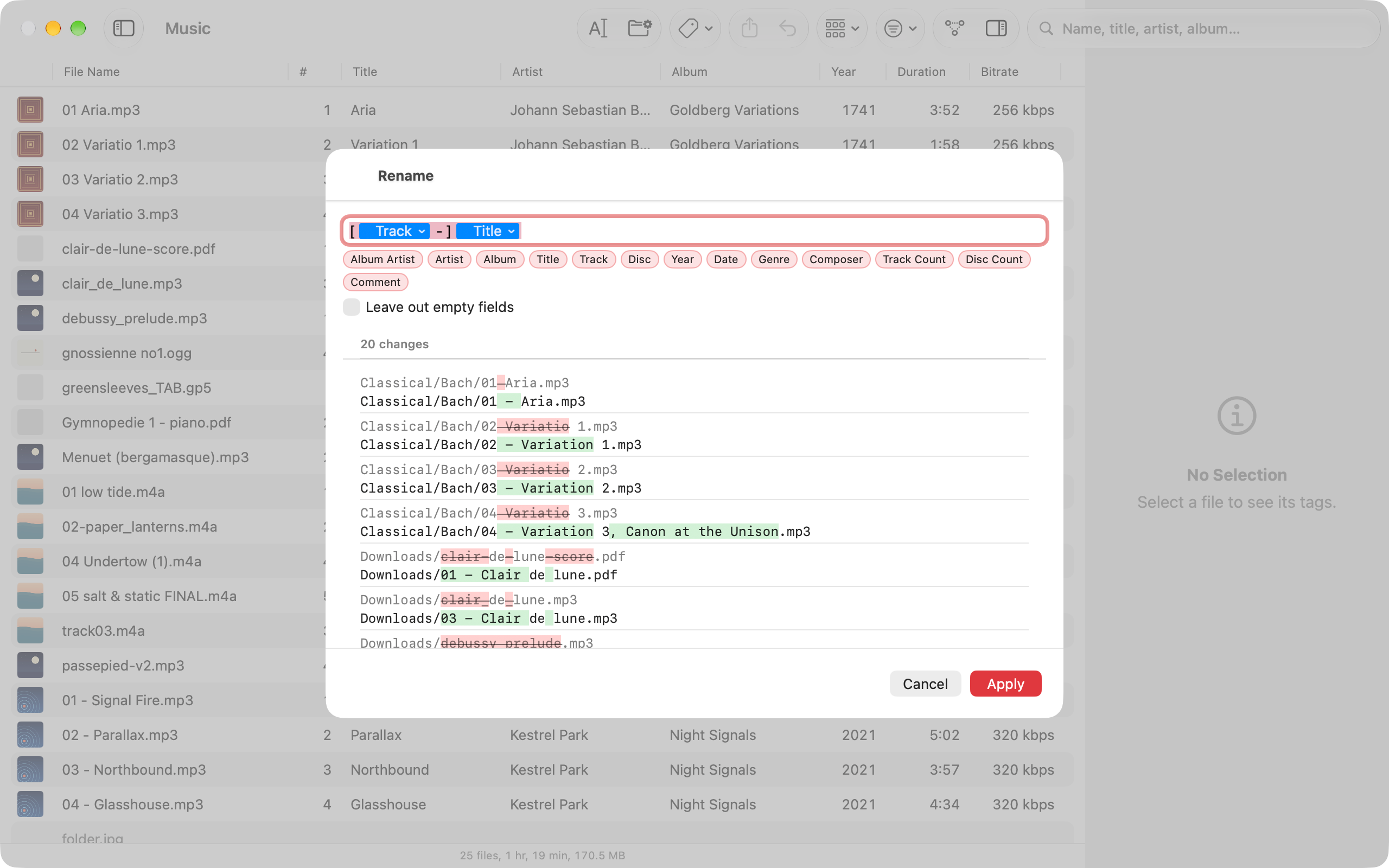
Padding, case and a stated policy for the characters a disk refuses. A file missing a tag the pattern needs is skipped, never mangled.
→ 03 - Phare.mp3
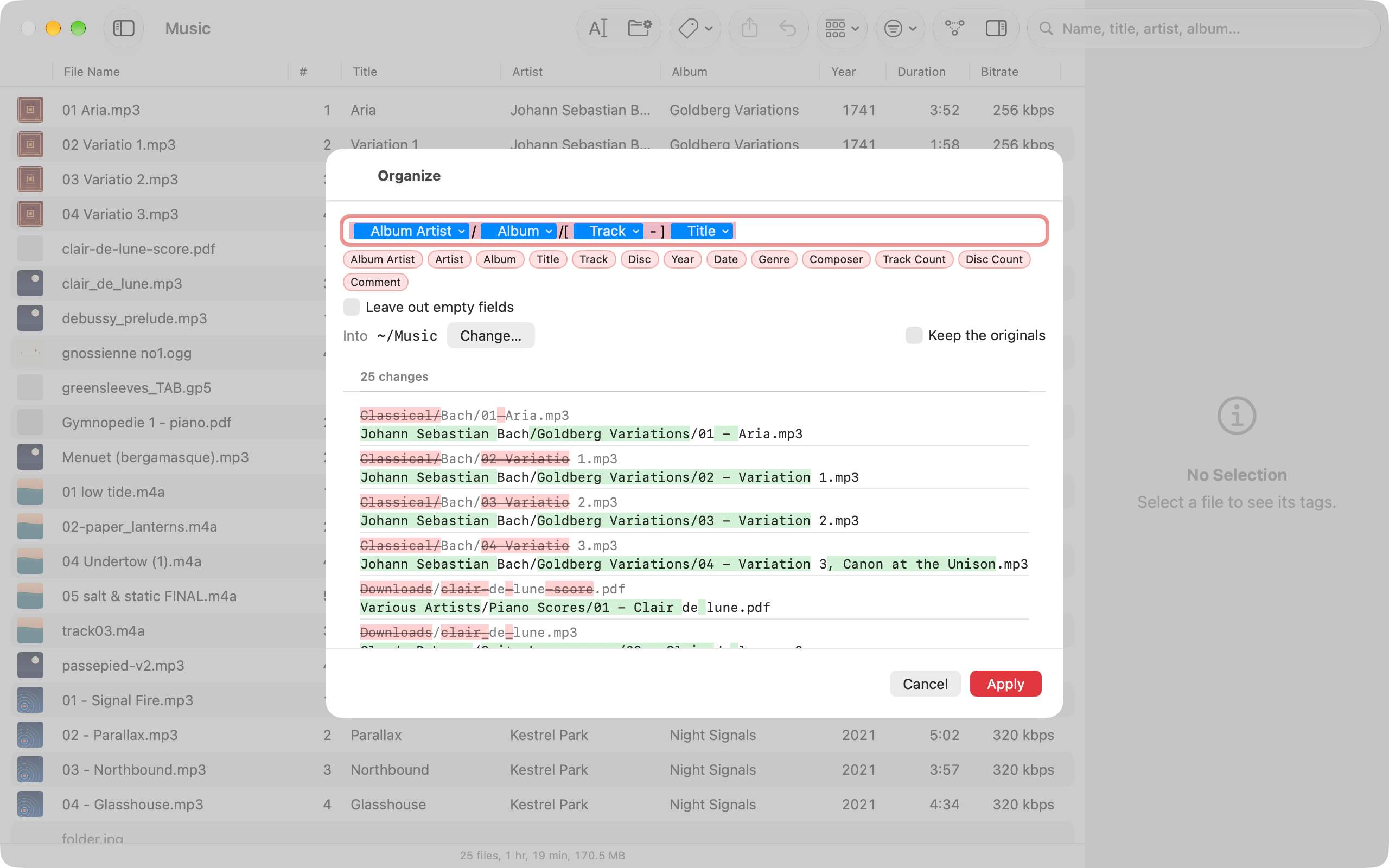
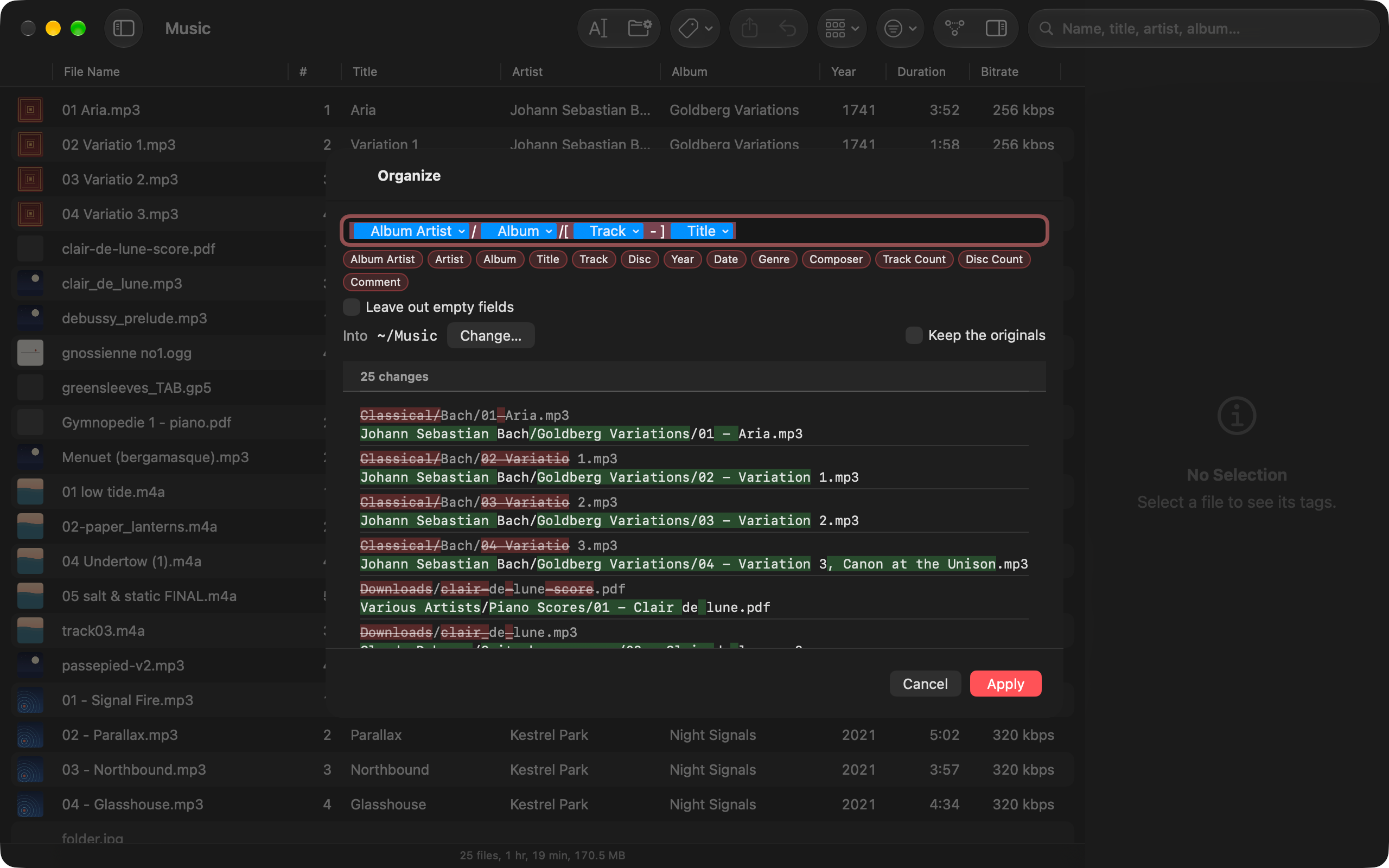
Organize, and back
The same pattern with slashes moves files. Covers, cue sheets and logs travel with their album. Arriving untagged? Run the pattern backwards to fill the tags from the path.
↳ cover.jpg, album.cue follow
A rename over 5,000 files shouldn’t be a frightening button.
Every operation is worked out as a plan and shown as a diff: old name beside new, old value beside new, conflicts on top. Apply it, and it is journaled. Change your mind next week, and it reverses.
- 1 Compute a plan. Nothing is touched yet
- 2 Read it as a diff, conflicts first
- 3 Apply it. Every step goes into a journal
- 4 Undo, even after you quit the app
- Les Marées/Basse Saison/03 - Phare.mp3
- Les Marées/Singles/Marée haute.m4a · no track, section dropped
- Opéra Minuit/Avant-Après/07 - Pourquoi_.opus · “?” replaced
- Zero-padded tracks
- lowercase · UPPERCASE
- Refused characters → _
- Run backwards → tags
Write it once. Rename, organize, or read it back.
Square brackets make a section optional, so a single without a track number is still named properly. Slashes make folders. And the same pattern, run backwards, fills in the tags of a library that arrived with nothing but its paths.
- Set one field across a selection
- Find and replace across tags
- Number tracks in the order you see them
Nine formats,
written by hand.
Pochette’s own reader and writer for each container. What it doesn’t understand is kept byte for byte, the audio is never re-encoded, and the original is never truncated first.
- MP3 ID3v2.3 · v2.4 written
v2.2 · ID3v1 read - AAC .m4a · .m4b · .mp4
raw .aac · ALAC too - Ogg Vorbis · Opus
pages re-checksummed - FLAC comment & picture blocks
padding resized in place - AIFF .aiff · .aifc
ID3v2 in its own chunk - WAV ID3v2 in its own chunk
LIST/INFO left alone - MIDI tagged as RMID
Undo converts it back - PDF its Info dictionary
appended, not rewritten - Guitar Pro .gp3 · .gp4 · .gp5
the five fields it holds
A file Pochette can’t read is still listed, greyed out. A folder never looks emptier than it is.
Your library, wherever Files can reach it.
One native app for all three, for a folder on this device or on iCloud Drive, where files not yet downloaded are listed without fetching them. On the Mac, the Music media folder is held to tags only.
Let an agent tidy up, through the same plans.
Pochette runs an MCP server for AI agents such as Claude Code or Codex. It is off until you turn it on, and listens on this Mac only. An agent reads your libraries and previews a change; it changes files only once you allow writes, and what it applies goes into the same journal as your own edits, so Undo takes it back.
- agent pochette_preview · organize Basse Saison ↳ 12 moves · 0 conflicts
- agent apply ↳ journaled, like your own
- you Edit › Undo ↳ 12 moves taken back
The folder is the library.
-
No database
Nothing to import, nothing to sync. Pochette reads what is on disk.
-
No account
No sign-in, no lookups, no analytics. Nothing about your music is sent anywhere.
-
Sniffed, not guessed
A format is read from the file’s first bytes, never its extension.
-
Tidy exits
A folder is removed only when Pochette is the one that emptied it.
Does Pochette change the audio?
No. It rewrites the tag block and copies the audio as it is, so nothing is re-encoded. A tag is written to a new copy of the file that then replaces the original, so the original is never cut short halfway through.
Which files does it handle?
MP3 (ID3v2.3 and v2.4 written; v2.2 and ID3v1 read), AAC and ALAC in .m4a, .m4b and .mp4, raw .aac, Ogg Vorbis and Opus, FLAC, and AIFF and WAV, both with an ID3v2 tag of their own. Scores too: PDFs, Guitar Pro tabs (.gp3, .gp4, .gp5) and MIDI files, which take tags once converted to RMID, a conversion Undo turns back. Every format is recognised from the file’s own bytes, never its extension.
Do I have to import my library?
No. There is no import and no database: open a folder and every audio file under it is listed, read straight from the files. Close Pochette and nothing is left behind but the files.
What if I apply a change and regret it?
Every applied plan is written to a journal, and Edit › Undo replays it backwards, even after you quit and reopen the app. If you would rather not touch the originals at all, Keep the originals turns an organize into copies.
Does it work with the Music app’s library?
On the Mac you can open the Music media folder by hand, and Pochette then edits tags only: it never renames or moves a file there, so it never fights Music over its own layout.
Does it need an account or an internet connection?
No. Pochette has no account and needs no connection to work. It only touches the folders you give it. The instruments MIDI files play with, and on the Mac the languages Transcribe Lyrics uses, are fetched by the system from Apple the first time they are needed. The one download Pochette makes itself is the model that splits a track into stems, from Hugging Face, when you ask for it on the Mac.
What about iPhone and iPad?
It is the same app. Open a folder from Files, iCloud Drive included: files not yet downloaded to the device are listed without being downloaded, and fetched only when you ask.
How much does it cost?
Pochette is free on up to 10 files at a time, so you can try a rename on your own music first. Pochette Pro is one purchase, $9.99 in the US, with no subscription: it applies a change to any number of files, on your Mac, iPhone and iPad, and adds the Mac’s MCP server and the Concert Grand piano for MIDI files. Browsing, playing, search and undo are never limited.
When can I get it?
Now, from the App Store: the same app for Mac, iPad and iPhone. It needs macOS 26, iPadOS 26 or iOS 26.
-
 Cadence who said what, and when
Native macOS transcription with speaker identification, on the Neural Engine, offline.
Put every record back in its sleeve.
Free on up to 10 files at a time. Pochette Pro, one purchase ($9.99 in the US), for the rest, on Mac, iPad and iPhone.
On the App Store · Requires macOS 26, iPadOS 26 or iOS 26